Contraception and a pill reminder
updated November 28, 2026 • 2 minIn short
- Settings → "My cycle" → "Contraception"
- It is only a note — Aya gives no advice on methods
- For pills — the pack schedule and a reminder at your time
Note your method
- Settings → "My cycle" → "Contraception".
- Choose what you use: combined pill, mini-pill, hormonal IUD, copper IUD, ring, patch or other.
- For the pill pick the "Pack schedule" and the date of the "First pill of the pack". For the ring and patch — the date it went in or on.
- "Save".
Pack: taken or missed
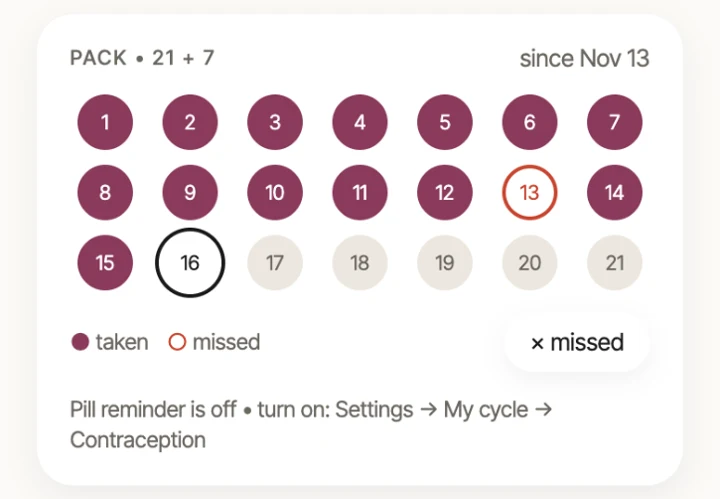
For the pill, ring or patch with a scheme, a pack of circles appears on "Today".
- "Taken" on Today fills that day's circle.
- "× missed" gives the circle a red outline.
- Made a mistake — tap the circle and choose "taken", "missed" or "clear".
What to do after a missed pill depends on your pill — check its leaflet or ask a doctor.
Pill reminder
- In the same window turn on "Reminder" and tap the time to choose yours.
- Or: Settings → "Reminders" → "Pills" → the "time" row.
- To mark a pill as taken — the "Taken" button on "Today".
Reminders arrive by your phone's clock. How to turn on notifications — see "Reminders and your own time".
Questions
Why did the ovulation forecast disappear on the pill?
On the combined pill, ring and patch there is no ovulation, so Aya shows withdrawal bleeding by your pack schedule instead of fertile days.
Still stuck?Write to us from the app: Settings → Help → Contact. We reply in the chat.
Open Aya